
Retail camera intelligence
Cameras see. Agents take it from there.
Store Shepherd agents monitor existing security cameras, isolate the relevant sequence and prepare a clear incident for staff review.
Useful moment prepared · Candy aisle
The operational gap
Cameras keep recording. Nobody can keep watching.
Footage is created continuously, while store teams have other work to do.
Most systems preserve evidence. They do not prepare the moment that needs attention.
01Relevant events remain inside long recordings.
02Review often starts only after a loss is discovered.
03Raw alerts still leave staff to reconstruct the incident.
How it works
One clear sequence from camera feed to staff decision.
Store Shepherd selects the useful clip, adds context, routes it to the right employee and records the decision.
Watch for a relevant sequence
Store Shepherd analyzes the camera feed for behavior that may need a closer look.
Prepare the useful moment
The system selects the short clip, camera, time and plain-language event context.
Route it for review
The case reaches the right employee on desktop or mobile while the moment is still useful.
Record the staff decision
A person confirms, dismisses or marks the event unclear. Store Shepherd records the outcome.
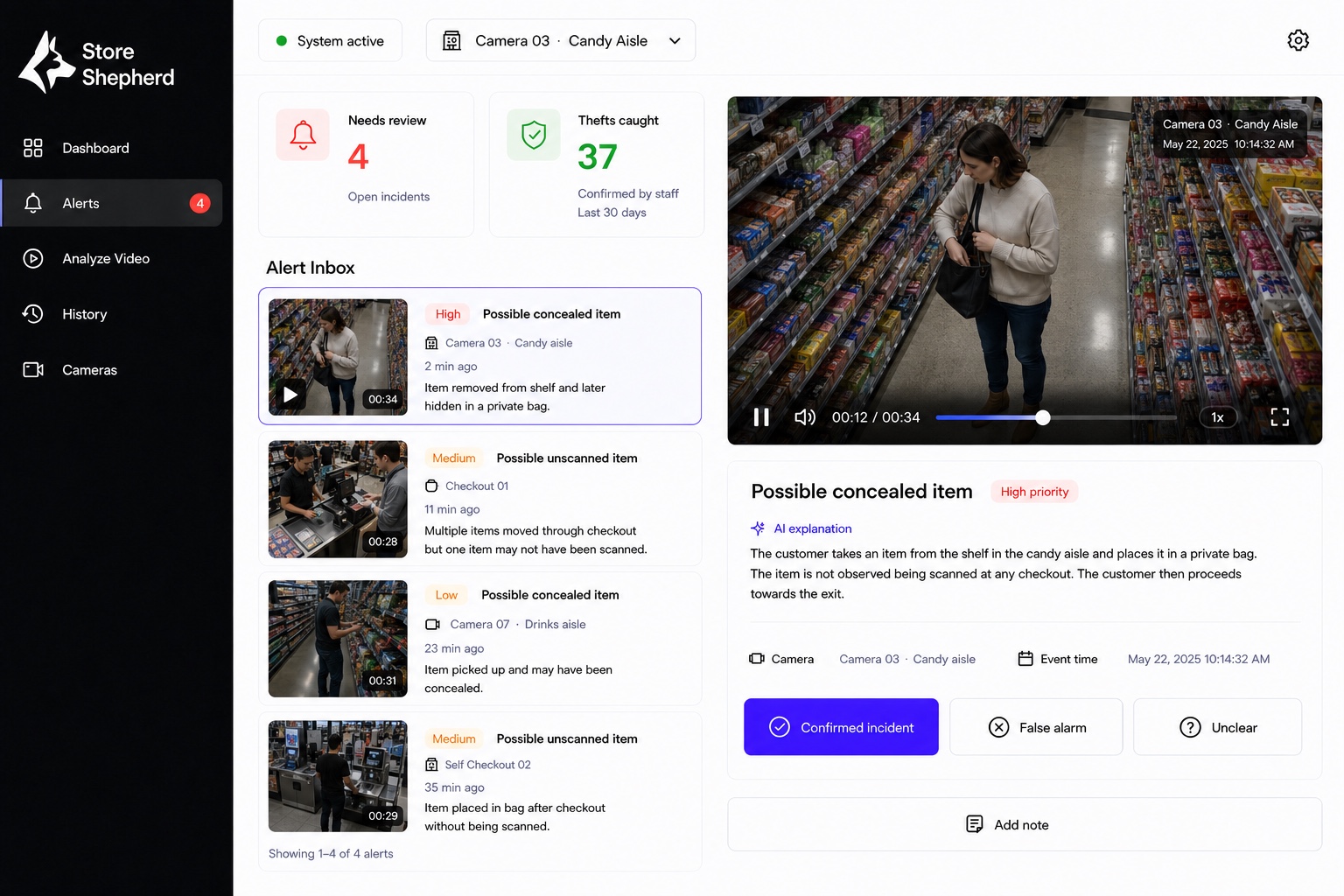
Alert workspace
The evidence and the decision live in one view.
The selected clip, camera, event time and explanation arrive together. Staff can confirm, dismiss or mark the incident unclear.

Useful clip instead of a full camera timeline.
Plain context before someone starts reviewing.
Recorded outcome for the next operational step.
Review where the work happens
A prepared incident can reach the team on mobile.
Staff see the alert, open the relevant clip and record a decision without returning to a CCTV room.
- Alert with camera and location
- Short clip and event summary
- Confirm, dismiss or mark unclear

Built for responsible review
What this isn’t matters.
Store Shepherd helps a retail team find and review a relevant sequence. It is not a system for identifying people or making final judgments on its own.
No facial recognition
The product reviews event sequences, not identities.
No autonomous accusation
The system surfaces a case. Your staff make the decision.
No camera replacement
It is designed to work with the CCTV infrastructure already installed.
No demographic profiling
It does not classify customers by personal characteristics.
Pilot request
Start with a defined store environment.
Tell us about your operation. We will discuss the camera setup, review workflow and a focused pilot scope with your team.
01Existing camera setup
02Priority store zones
03Review and response workflow